

Imagine checking your dashboard only to find dozens of orders stuck in limbo while your warehouse sits idle. If you’re currently asking why my shopify orders are not syncing with 3pl, you’re likely feeling the pressure of mounting customer complaints and the dread of manual data entry. It’s an exhausting cycle that turns your streamlined operation into a source of constant friction. You deserve a system that works as hard as you do, without the fear of missed shipments during your busiest sales periods.
This article provides the roadmap to restore your automatic order flow and eliminate these technical headaches for good. We’ll break down the common culprits, from SKU mismatches to the critical June 30, 2026, sunset of Shopify Scripts that requires a shift to Shopify Functions. You’ll discover how to audit your API versions and location settings to ensure your data moves effortlessly between platforms. By the end of this post, you’ll have a clear plan to fix your sync today and build a more resilient, automated future for your logistics.
Key Takeaways
- Learn how to trigger a manual sync to clear immediate bottlenecks and ensure no past orders are filtered out of your queue.
- Diagnose why my shopify orders are not syncing with 3pl by performing a targeted audit of SKU typos and Shopify Location permissions.
- Distinguish between push and pull sync methods to identify if API rate limits are stalling your order flow during peak periods.
- Establish a SKU governance rule to prevent future breaks by ensuring every new product is synced before it goes live.
- Discover how a cloud-based WMS platform simplifies your operations and restores the effortless control you need to grow your business.
Quick Fixes: How to Force a Shopify Sync with Your 3PL
When you realize my shopify orders are not syncing with 3pl, the immediate priority is clearing the backlog. Before diving into deep technical audits, check the basics. Most Third-party logistics (3PL) integrations only pull orders that are marked as “Paid” and “Unfulfilled” in Shopify. If your payment gateway is set to “Authorize” only, the sync won’t trigger until you capture the funds. Similarly, determine if the issue is universal. If only certain SKUs are missing, you’re likely looking at a data mismatch rather than a total system failure.
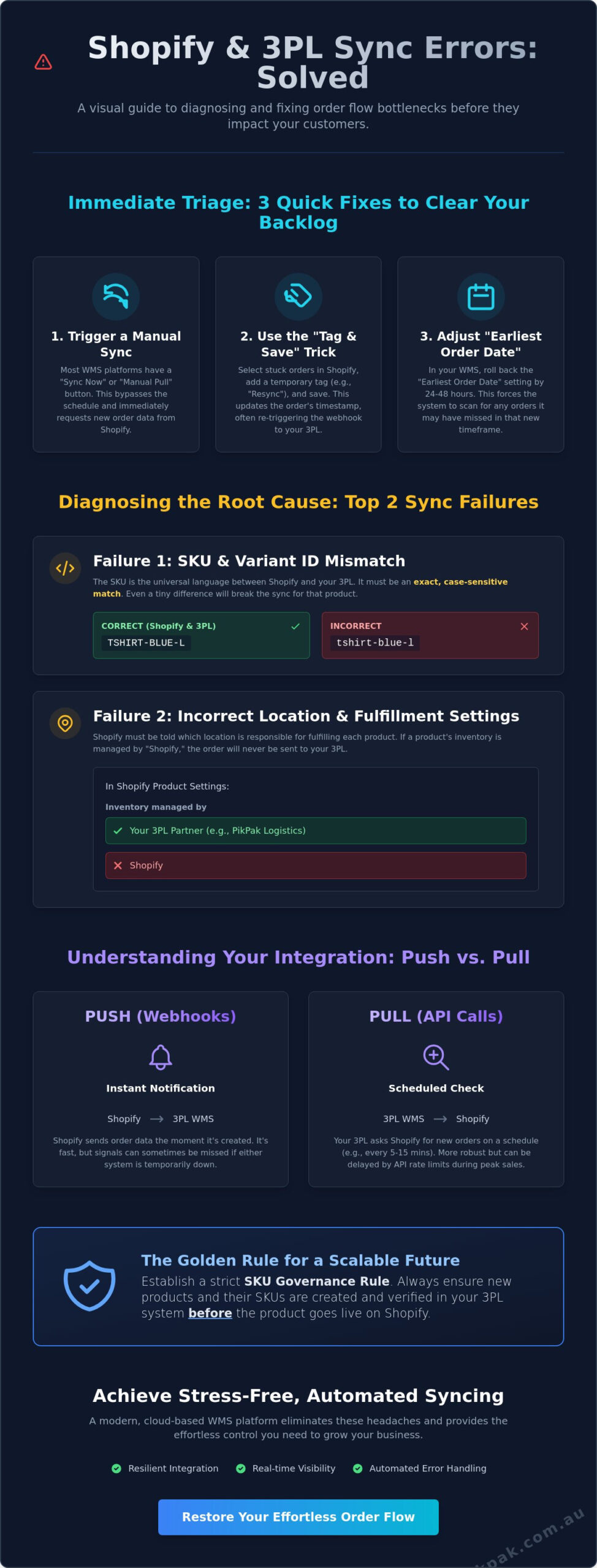
Most modern warehouse management systems include a “Sync Now” or “Manual Pull” button. This forces the system to bypass the usual scheduled interval and ask Shopify for new data immediately. It’s the first step in any troubleshooting process. If a manual pull doesn’t work, the issue usually lies within the order data itself or the connection permissions between the two platforms.
The “Tag and Save” Trick to Re-trigger Webhooks
Webhooks are the digital pings that tell your warehouse an order exists. Sometimes these signals fail to reach their destination. You can often force a re-sync by adding a temporary tag to your orders in Shopify. This simple update changes the order’s “last modified” timestamp, which frequently triggers a fresh webhook to your 3PL provider.
- Go to your Shopify Orders page and filter by “Unfulfilled.”
- Select the orders that haven’t synced.
- Click “More Actions” and select “Add tags.”
- Type a temporary tag like “Resync” and save.
This action forces Shopify to broadcast the order data again. While effective for a few missed shipments, remember that this is a temporary fix. If you find yourself bulk-tagging orders every morning, your integration has a fundamental flaw that requires a more permanent solution.
Adjusting the Earliest Order Date in Your WMS
The “Earliest Order Date” is a critical setting in platforms like the Pik Pak WMS. It acts as a gatekeeper for your data flow. If this date is set to today at 10:00 AM, the system will ignore every order placed at 9:59 AM. This setting is designed to prevent old, already-shipped orders from flooding a new integration, but it can also cause “missing” orders if not managed correctly.
To capture missed orders, you can “roll back” this date in your 3PL dashboard settings. By moving the date back 24 or 48 hours, you prompt the system to perform a comprehensive API call to Shopify. It will scan for any unfulfilled data within that new window that it might have skipped. This is a highly efficient way to restore order flow without the risk of manual data entry errors. It’s a pragmatic approach that puts you back in control of your fulfillment timeline immediately.
The 3 Most Common Reasons Shopify Orders Fail to Sync
When you find that my shopify orders are not syncing with 3pl, the root cause usually lies in your data architecture. As the e-commerce revolution accelerates, the complexity of multi-channel selling often leads to minor data discrepancies that halt your entire operation. These aren’t random glitches; they are specific logic breaks in how Shopify communicates with your warehouse management system (WMS). Most failures stem from three core areas: SKU architecture, location permissions, and inventory thresholds.
SKU and Variant ID Alignment
The Stock Keeping Unit (SKU) is the primary language your systems use to talk to each other. If Shopify lists a product as “TSHIRT-BLUE-L” but your 3PL system sees “tshirt-blue-l,” the sync will fail. These fields are case-sensitive and must be identical. A SKU mismatch is the primary barrier to automated order fulfilment. To audit this, export your Shopify product list as a CSV and compare it against your 3PL inventory report using a simple spreadsheet formula. This helps you catch “Ghost SKUs” or variant ID errors that often hide in plain sight.
Shopify Location and Fulfillment Service Settings
One of the most overlooked hurdles is the “Location” setting within your Shopify admin. Every product variant has an “Inventory managed by” field. If this is set to “Shopify” or a different warehouse location, your 3PL will never receive the order data. You must ensure your 3PL is selected as the active fulfillment service for every item. This becomes particularly tricky with mixed orders that contain both 3PL-managed stock and items you ship from your own office. Without the correct location permissions, Shopify won’t know which data to send to which partner, leaving your orders unfulfilled and your customers waiting.
Beyond these settings, keep an eye on your inventory levels and API health. Most integrations are programmed to stop syncing orders if the 3PL system shows zero stock to prevent overselling. Additionally, API permissions can occasionally expire, requiring you to re-authenticate the app connection. If you’re tired of chasing sync errors, our technology support team can help you build a more stable bridge between your store and warehouse. Taking the time to align these settings now creates the effortless control you need to scale without friction.
Technical Lag: Understanding API Heartbeats and Webhooks
Technical lag is often the silent culprit when my shopify orders are not syncing with 3pl. To solve this, you need a basic grasp of Understanding API Heartbeats and Webhooks. Most modern integrations use a “Push” method. This is where Shopify sends data to your warehouse the moment an order is confirmed. In contrast, older systems use “Pulling” or API Polling. This means the 3PL system asks Shopify for updates at set intervals, such as every 15 or 60 minutes. Understanding which method your provider uses is the first step in managing your expectations and troubleshooting delays.
During high-traffic events like Black Friday or Cyber Monday, your store might hit “API Rate Limits.” This occurs when Shopify throttles the data flow to ensure platform stability across its entire network. While a 15-minute sync latency is standard during these peaks, a 4-hour delay indicates a system failure that requires manual intervention. This is why Australian-based technical support is a major advantage for local brands. You need experts who are active during your business hours to resolve API bottlenecks before they impact your delivery promises. Waiting for an overseas help desk to wake up can cost you thousands in lost productivity and customer trust.
Checking the Shopify App Health
If your automation stops, check your Shopify App Logs first. You can find these in the “Apps and sales channels” section of your admin dashboard. These logs contain specific error codes that act as a diagnostic report for your integration. For example, a “401 Unauthorized” error usually means your API key has expired and needs a simple refresh. A “422 Unprocessable Entity” error often points to a data validation issue, like an invalid phone number or a SKU that doesn’t exist in your warehouse system. These logs help you determine if Shopify is experiencing an outage or if there is a break in the 3PL’s technology support.
The Role of Warehouse Management Systems (WMS)
A professional Warehouse Management System (WMS) acts as the central brain of your operation. It takes raw Shopify data and translates it into actionable tasks for the pick and pack team. For growing eCommerce brands, real-time visibility is no longer a luxury; it’s a requirement for survival. You must be able to track an order from the moment of payment to the final home delivery. Pik Pak’s cloud-based WMS provides real-time visibility into every order status, giving you the confidence to scale without fear of technical breakage. This level of transparency ensures that you always have the answers for your customers, keeping your brand reputation intact and your operations running smoothly.
Preventing Sync Issues: A Scalable Integration Framework
If you’re tired of wondering why my shopify orders are not syncing with 3pl, you need a proactive framework to stop errors before they start. Crisis management is expensive. Prevention is simple. Establish a strict SKU Governance rule where no product goes live on your store until it’s verified in your WMS. This single policy eliminates the most common cause of sync failure. You should also implement inventory buffers. By setting your system to show “out of stock” when you have a few units left, you avoid the sync blocks caused by overselling. Dedicate five minutes each day to auditing your “Unfulfilled” tab. This catches edge-case errors, like invalid addresses, before they trigger customer complaints.
Testing Your Integration Workflow
Don’t wait for a peak period to find a flaw in your system. Perform a “Ghost Order” test by placing a real order and following its digital path. You must verify that the order reaches the warehouse and that the tracking information syncs back to Shopify once the label is printed. This bi-directional flow is the foundation of automation. You also need a clear process for “Order Edits.” If a customer changes their address after the data has reached the warehouse, your team needs a specific workflow to update the WMS directly. This prevents shipping to the wrong location and keeps your data clean.
Choosing the Right 3PL Integration Partner
Your fulfillment technology should be an asset, not a hurdle. Pre-built connectors are generally safer than custom API scripts because they are maintained by experts and updated alongside Shopify’s platform changes. A partner who understands the Australian logistics landscape will ensure your carrier integrations are optimized for local delivery. Review Pik Pak’s services to see how our integration specialists support you during onboarding. We focus on building a robust connection from day one so you can reclaim your time. If you’re ready for a more reliable sync, explore our technology solutions to see how we can streamline your order flow.
Why Pik Pak Logistics Delivers Stress-Free Shopify Syncing
Solving the mystery of why my shopify orders are not syncing with 3pl shouldn’t be your full-time job. You started your business to create products and serve customers, not to audit API logs and troubleshoot webhook failures. Pik Pak Logistics replaces that operational friction with a robust, cloud-based platform designed specifically for the Shopify ecosystem. We transform complex logistical hurdles into simple, manageable tasks, giving you the effortless control needed to scale without technical anxiety. If you’re tired of checking your dashboard and seeing unfulfilled orders that never reached the warehouse, it’s time to partner with a team that prioritises your peace of mind.
Our approach is grounded in transparency and automation. You’ll have access to real-time reporting that shows exactly which orders are picked, packed, and shipped. This visibility eliminates the guesswork and allows you to reclaim your time. Instead of chasing sync errors, you can refocus on your core objectives and business growth. Our Australian-based team provides pragmatic, expert support, ensuring that when a technical question arises, you’re speaking to someone who understands your business and your timezone.
Seamless Onboarding and Tech Support
We believe that a successful partnership starts with a solid foundation. Our integration specialists guide you through the initial setup, handling the heavy lifting of SKU mapping and Shopify Location settings. We ensure that every product variant is correctly aligned with our WMS before your first order even drops. This meticulous onboarding process prevents the common data mismatches discussed earlier. Through our dedicated platform, you gain real-time inventory and order status visibility, making logistics feel like a natural extension of your store rather than a disconnected burden.
Beyond Syncing: A Complete Fulfilment Partner
A reliable technical sync is just the beginning. As your brand grows, you need a partner that can scale with you. Our pick, pack, and ship services provide the logical next step for businesses ready to automate their entire supply chain. Based in Melbourne, our expertise extends across a nationwide customer delivery network, ensuring your products reach your customers quickly and securely. We don’t just outsource your tasks; we enable your growth by removing the operational barriers that hold you back. Request a consultation with Pik Pak today to audit your current Shopify integration and discover how we can streamline your path to success.
Take Control of Your Shopify Automation
Restoring your order flow requires a clear understanding of your data architecture. By auditing your SKU alignment and verifying your Shopify Location permissions, you can eliminate the most common technical hurdles. We’ve explored how technical lag and API rate limits impact your store during peak periods. The ultimate goal is to move beyond constant troubleshooting and into a phase of effortless growth where you don’t have to worry about the backend.
Stop asking why my shopify orders are not syncing with 3pl and delegate your logistics to a partner built for the task. Pik Pak Logistics offers a cloud-based WMS with real-time Shopify sync and a dedicated Australian technical support team to keep your operations moving. With our 99.9% order accuracy and same-day pick and pack services, you can reclaim your time and focus on your core objectives.
Tired of sync errors? Switch to Pik Pak’s seamless Shopify fulfilment today.
Your business deserves a foundation that supports your ambition. Take the first step toward a more reliable, automated future today.
Frequently Asked Questions
Why are my Shopify orders showing as “Unfulfilled” even though they are in the 3PL system?
Shopify only updates an order status to “Fulfilled” once it receives a specific signal back from your 3PL’s warehouse management system. This signal is usually triggered when a shipping label is generated and a tracking number is assigned. If the order is visible in your warehouse dashboard but remains unfulfilled in Shopify, the return sync path is likely blocked or your integration lacks the “write” permissions required to update order data.
Can I manually push an order from Shopify to my 3PL?
You can typically trigger a manual sync through the “Sync Now” or “Manual Pull” button found within your 3PL’s Shopify app interface. This is the fastest way to resolve the issue when my shopify orders are not syncing with 3pl due to a temporary API timeout. If your app doesn’t offer this feature, adding or removing a tag on the order in Shopify will often force the system to broadcast a new webhook to your warehouse.
What happens if I change a SKU in Shopify after the product is already in the warehouse?
Changing a SKU in Shopify without updating your 3PL system will immediately break the sync for that product. Your warehouse management system uses the SKU as a unique identifier to know exactly which item to pick from the shelf. If the codes don’t match exactly, the 3PL system will reject the order because it can’t find a corresponding product in its inventory database.
Does Shopify notify my 3PL automatically when a new order is placed?
Shopify uses webhooks to send instant digital notifications to your 3PL the moment a customer completes a purchase. These webhooks act as a “push” notification, ensuring your warehouse receives the data in near real-time. If the webhook fails, most professional integrations have a backup “pull” system that scans Shopify for new orders at set intervals to ensure no data is missed.
How long does it typically take for a Shopify order to appear in a 3PL dashboard?
Most orders appear in a 3PL dashboard within 1 to 15 minutes of the transaction being completed. The exact speed depends on whether your 3PL uses instant webhooks or scheduled API polling. While a short delay is standard, any lag exceeding one hour suggests that your store might be hitting API rate limits or experiencing a connection error that needs investigation.
Why is my 3PL not sending tracking numbers back to my Shopify customers?
Tracking numbers fail to sync if the 3PL integration isn’t authorised to fulfill orders within your Shopify settings. You must ensure that the “Inventory managed by” setting for your products is correctly pointed to your 3PL location. Additionally, check your 3PL app configuration to confirm that the “Send Tracking Data” toggle is enabled, as this is the trigger that prompts Shopify to email your customers.
Is it possible to sync older, past orders from Shopify to a new 3PL?
You can sync historical orders by adjusting the “Earliest Order Date” in your 3PL’s integration settings. By setting this date to a point in the past, you prompt the WMS to scan Shopify for any unfulfilled orders within that window. This is a common step during onboarding to ensure that orders placed just before the transition are not left behind in the system.
What is the best way to test if my Shopify and 3PL are communicating correctly?
The most reliable method is placing a live “Ghost Order” for a physical product using your own shipping address. Track this order from the moment of checkout through to the 3PL dashboard to confirm the data arrived correctly. Finally, have the warehouse generate a test label to verify that the tracking number and fulfillment status successfully sync back to your Shopify admin.
